
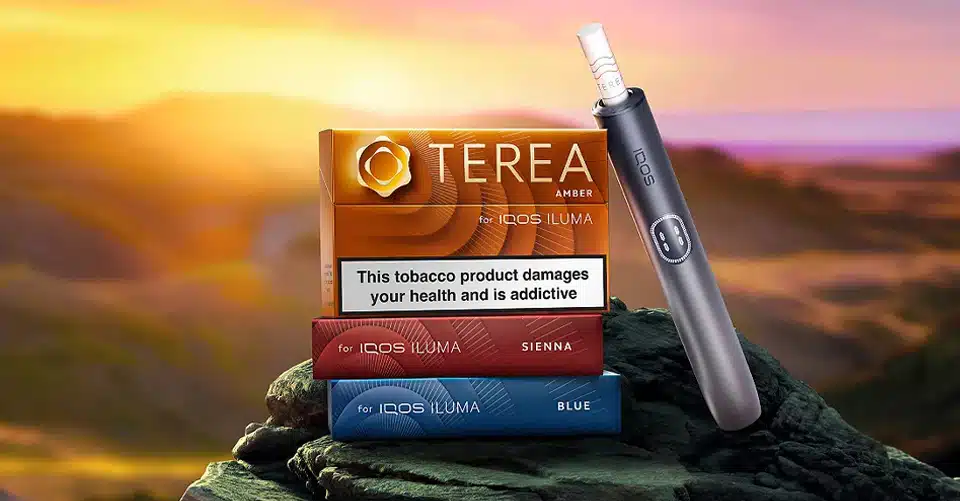
How to Read TEREA Pack Names and Codes
If a TEREA pack looks different from the one you remember, start by checking the complete variant name printed on the front. IQOS has introduced different packaging designs across markets, so the same variant may appear in more than one box design. Other markings on the packaging serve different purposes. A retail barcode identifies a trade item, while some markets also use individual pack codes for identification or promotional programmes. Their format and location depend on the market.
How to Identify a TEREA Variant
Read the Complete Name on the Front
Look for the TEREA name followed by its full variant description. In the official Georgian range, for example, TEREA Amber, TEREA Silver and TEREA Turquoise are listed as separate variants. Multiword names also need to be read in full. Sun Pearl, Starling Pearl and Twilight Pearl are distinct product names, so a listing that says only “TEREA Pearl” does not provide enough detail to identify the exact variant.
When comparing a physical pack with an online product listing, match the complete printed name with the listing title. If the product photo is too small to read or the listing uses an abbreviated colour name, request a clear image of the front panel. You can also compare the available names in the IQOS sticks catalogue.
Why the Same Variant Can Have Different Packaging
Different artwork does not necessarily mean that the tobacco variant has changed. In July 2024, IQOS Georgia introduced Art Series packaging for Russet, Silver, Turquoise and Purple Wave. The company explained that the new designs did not change the existing portfolio or the variants’ intensity, taste and aroma.
IQOS Georgia announced another packaging redesign in January 2026, explaining that the new appearance would help distinguish the different TEREA variants visually. Therefore, two packs labelled TEREA Turquoise may have different artwork while carrying the same variant name. Compare the printed product name and market information before drawing conclusions from packaging photographs alone.
What Do the Codes on a TEREA Pack Mean?
TEREA packaging can display several types of numbers and machine-readable markings. They do not all identify the same thing. Use this table to understand the main differences and avoid confusing a retail barcode with an individual pack identifier.
| Pack Marking | What It Identifies |
|---|---|
| Retail barcode and the number underneath | An EAN or UPC barcode represents a trade item number, also known as a GTIN. Packs belonging to the same trade item can share the same number. |
| Individual pack code | Its purpose and location depend on the market. IQOS UK describes a unique 12-character alphanumeric code printed on the base of each UK pack. |
| DotCode | A machine-readable marking. IQOS UK identifies this as a feature on the side of UK TEREA packs. |
| QR or promotional code | Some market-specific packaging uses codes for registration, rewards or promotional programmes. Availability and placement vary by market. |
Two TEREA boxes displaying the same number beneath the retail barcode are not necessarily unusual. That number can be shared by multiple packs of the same trade item. Individual identifiers are different: IQOS UK describes a unique code for each UK pack. Always establish which marking you are comparing before reporting a possible packaging issue.
Can You Identify the Production or Expiry Date From a Pack Code?
Do not automatically treat an unlabelled combination of letters and numbers as a production date or expiry date. First, look for an explicitly marked date on the packaging. If you only find an unfamiliar code, contact IQOS support for the market indicated on the pack and ask what the marking represents.
The UK individual pack code is documented as an identifier, while promotional codes in other markets can serve different purposes. These formats should not be treated as universal date codes. Without market-specific confirmation, you cannot reliably calculate a production or expiry date from an unlabelled string.
How to Check Which Market a TEREA Pack Was Made For
Read the Side and Back of the Packaging
Check the health warnings, distributor information and any country or market details printed on the side and back panels. These markings can help establish which market the packaging was prepared for. If you want to identify the manufacturing country, look for a separate country-of-manufacture statement rather than relying on the barcode.
GS1 explains that the first digits of an EAN barcode identify the GS1 organisation that allocated the number. They do not establish where the product was manufactured. A barcode prefix alone cannot confirm a TEREA pack’s country of production.
What Photos to Check When Comparing Two Packs
If you need help identifying a particular pack, take clear photographs of its front, side and base. Each view provides different information:
- Front: Shows the complete TEREA variant name and main packaging design.
- Side: May show market-specific labelling, warnings and machine-readable markings.
- Base: May contain an individual pack code or other identification details, depending on the market.
When contacting a support team about a specific pack, share the relevant code privately rather than posting the complete identifier publicly. Include the market details and photographs so the packaging can be assessed in context.
Check TEREA Compatibility With Your IQOS Device
Once you have identified the variant, make sure the product family matches your device. TEREA sticks are designed for compatible IQOS ILUMA devices, which use induction heating technology. They are not interchangeable with HEETS, which are made for older blade-based IQOS models.
If you are comparing a TEREA pack with an older HEETS pack, read our HEETS vs TEREA compatibility guide. It explains the differences between the two stick families and lists the IQOS models designed for each one.



Add comment
You must be logged in to post a comment.